iOS 27 introduces significant features to the Reminders app, enhancing user experience with improved reminder creation, metadata handling, and grocery list sorting.
With the arrival of iOS 27, Apple has made notable enhancements to the Reminders app, refining how users create reminders and manage their tasks. These upgrades aim to streamline productivity and improve usability. But why does this matter? For many users, productivity tools like this are essential for organizing their daily lives. Apple’s updates indicate a keen understanding of how their user base interacts with these tools; the tech giant seems to be shifting its focus towards enhancing user experience rather than simply adding features for the sake of it.
Describe Your Reminder
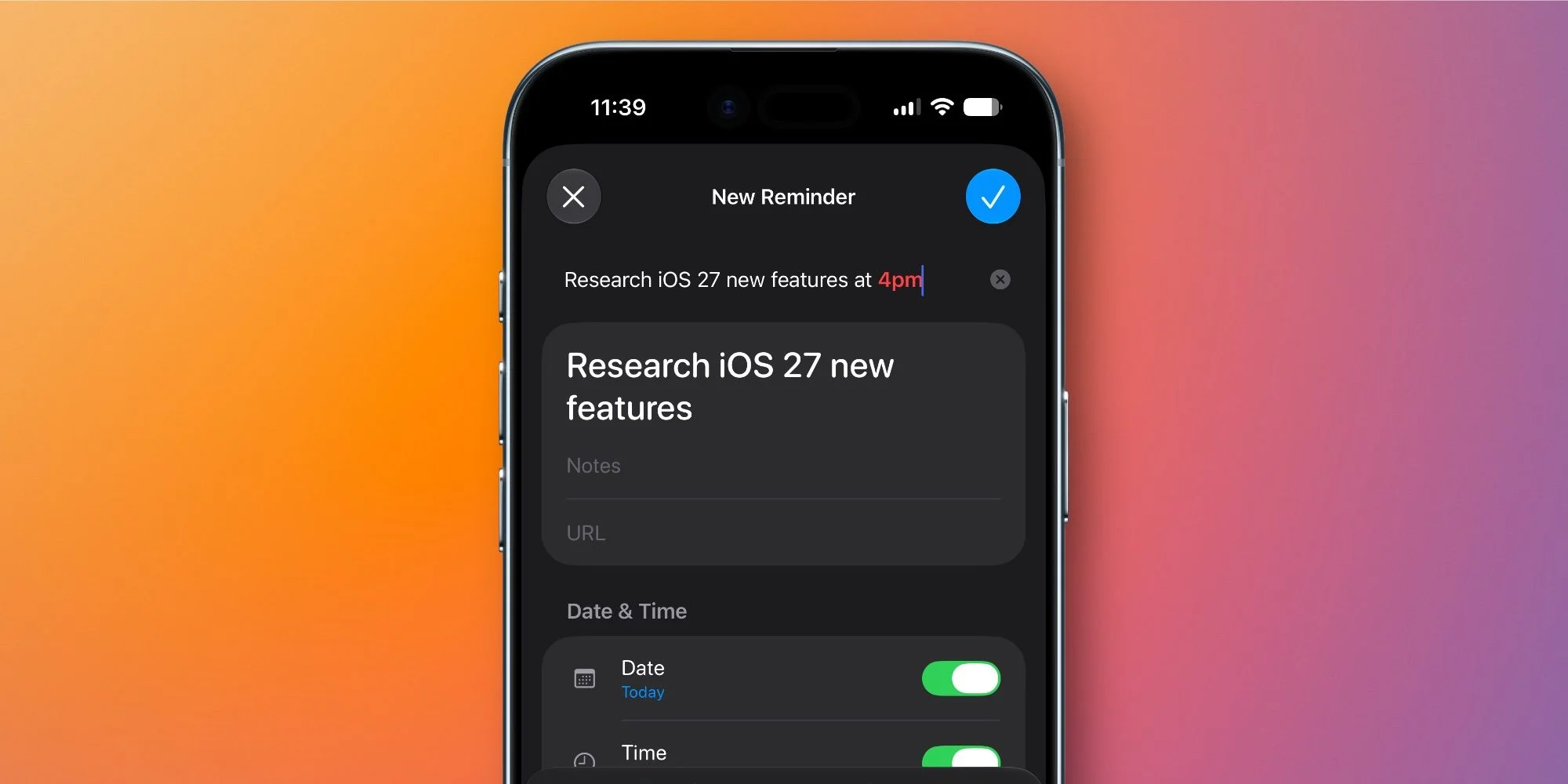
This version of Reminders introduces an updated natural language processing capability. Users can now more freely describe their reminders in everyday language, allowing Apple Intelligence to automatically tag relevant metadata associated with their input. For instance, if you mention a specific date or time in your description, the system will parse these details without needing you to manually enter them. This shift towards natural language recognition mirrors trends in technology where user-friendly interfaces become paramount. After all, who wants to wade through complex menus when a simple phrase will do?
Describe a New Reminder: Use your own words, and Apple Intelligence will assist in creating it.
This feature promises to make the reminder creation process faster, although it remains to be seen whether both old and new methods will coexist as iOS 27 moves through testing phases. Users who've grown accustomed to traditional input methods might be hesitant to switch, or they may enjoy the added convenience of voice-like entry. And yet, Apple's decision displays its commitment to staying ahead in the productivity app game. The potential for automation in task management is immense; users may find themselves moving through tasks more fluidly than ever before.
Upgraded Metadata Editor Inside Lists
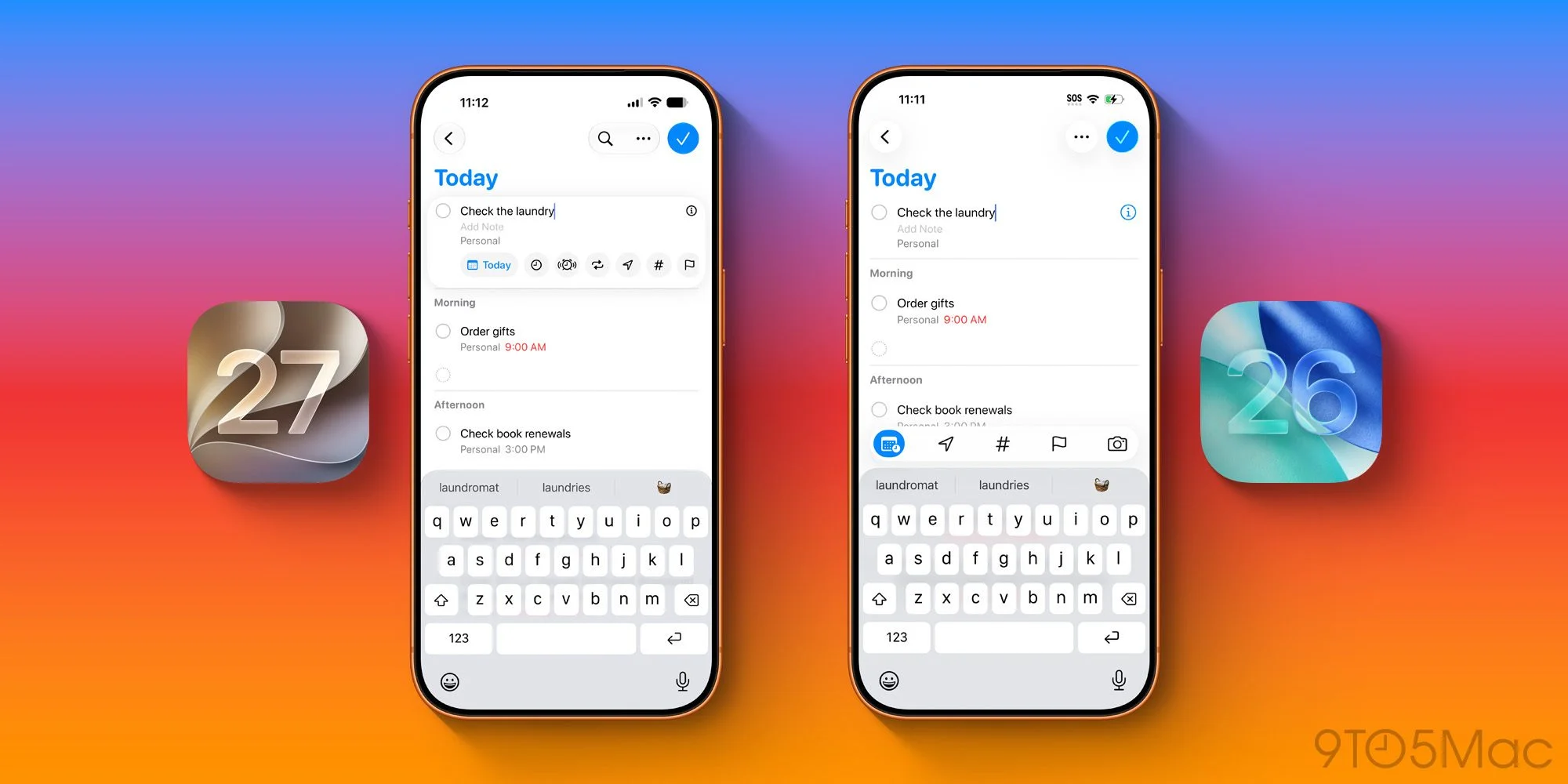
Previously, the metadata editing options in Reminders were limited to a narrow band above the keyboard. In iOS 27, Apple enhances this functionality with a redesigned metadata panel surrounding the currently active reminder. This updated interface groups all relevant options—such as Date, Time, Urgent, Repeat, Location, Tag, Flag, and Camera—into a single, user-friendly view. It's a welcome change that minimizes the friction often found in task management. Who hasn't felt the frustration of flipping between screens just to set a location or flag an item urgent?
This new format not only simplifies adding or editing tasks but reduces the need to navigate away from the current reminder to access additional settings. The focused layout encourages users to engage more deeply with the app rather than merely treating it as a transactional tool. It's about forming habits, and Apple appears to be acknowledging that streamlining workflow is essential for habit-building in productivity applications.
Grocery List Improvements

The grocery list feature sees notable improvements as well, specifically regarding its auto-sorting capabilities. Apple claims the sorting mechanism is now more accurate and supports multiple languages. Thanks to enhanced Foundation Models that power iOS 27, this feature delivers better performance in organizing grocery items than previous iterations. But beyond just technical performance, there's a psychological aspect to consider; when making a grocery list, users can be a bit overwhelmed. Better organization can translate to less time spent wandering the aisles and more efficient purchasing.
If you’re interested in maximizing your use of Reminders’ grocery list, Apple provides detailed guidance in their support documentation. However, the real test will be user adoption. If you're working in this space and rely on reminders for productivity, getting accustomed to these enhancements might take some time, but the payoff could be significant.
What features in iOS 27 are you most excited to explore in Reminders? Share your thoughts in the comments below.
Implications and Significance
The updates to the Reminders app in iOS 27 reflect broader industry trends towards user-centric design and the integration of artificial intelligence. Just as many software and app developers are beginning to understand, making tools that think for you not only simplifies user experience but also cultivates a habit of engagement. This strategic shift can impact how productivity apps are developed moving forward; simplicity and intuitiveness are likely to become key competitive factors.
The success of these features will hinge largely on user feedback during the testing phases. Apple has paved the way for expanding how we interact with reminders, yet whether users will fully embrace these changes is a different story altogether. If Apple can successfully marry efficiency with usability, they might redefine what task management looks like, pulling more users into frequent, effective use of their software ecosystem.
And this is the part most people overlook—while features are important, user experience is everything. Apple needs to ensure the enhancements don’t overwhelm existing users but rather complement their tasks. The future landscape of productivity tools will likely hinge on striking that balance.
Discussion
Sign in to join the discussion.