Explore how GitHub Copilot's ghost text and next edit suggestions can elevate your R programming skills, making coding more efficient and intuitive.
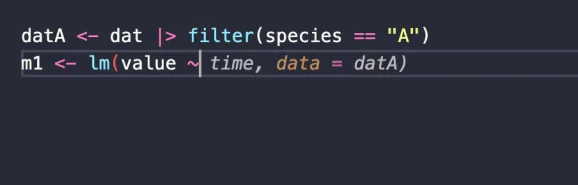
GitHub Copilot’s ghost text feature and next edit suggestions have fundamentally altered how data analysts approach coding in R. Unlike a fully autonomous AI system, these tools empower users by enhancing their coding experience, allowing for greater control over the development of solutions. The emphasis here is on clarity of specification—a crucial skill in programming.
While this discussion centers on R, the principles extend across various programming languages. Utilizing GitHub Copilot with the VSCode extension, which should work with both free and paid subscriptions, can significantly streamline your workflow.
Utilizing Ghost Text
Ghost text appears as greyed-out code completions while typing. For instance, imagine you have a time series dataset for three species that you want to analyze:
library(dplyr)
library(ggplot2)
dat <- data.frame(
time = rep(1:10, 3),
species = rep(c("A", "B", "C"), each = 10),
value = c(rnorm(10, mean = 5), rnorm(10, mean = 10), rnorm(10, mean = 15))
)
When you're filtering data for a specific species and fitting a linear model, Copilot's ghost text fills in the code as you type. For example, after inputting m1 <- lm(value ~, the tool suggests completing the line:
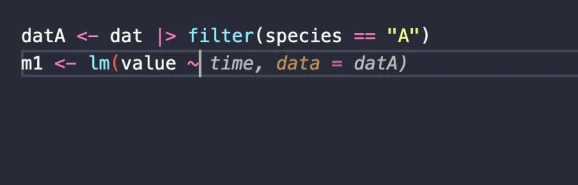
By pressing tab, you can easily complete the code for species A, leading to efficient modeling:
datA <- dat |> filter(species == "A")
m1 <- lm(value ~ time, data = datA)
coef(m1)["time"]
ggplot(datA, aes(x = time, y = value)) +
geom_point() +
geom_smooth(method = "lm", se = FALSE) +
labs(
title = "Species A Time Series",
x = "Time",
y = "Value"
)
This focused approach emphasizes perfecting one case before generalizing, mirroring the best practices that make programming agents effective.
Activating Next Edit Suggestions
The next edit suggestions functionality advances the utility of ghost text further by anticipating your next steps. Instead of just completing your current line, it identifies what you'll likely modify next.
Enable this feature by clicking the octocat icon in the bottom right of the VSCode interface and turning on Next Edit Suggestions. While this feature can be distracting at times, it can be quite beneficial for specific tasks.
Once activated, if you begin drafting a function header like fit_fun <- function(species_name), Copilot notices the hardcoded "A" and alerts you to change it:
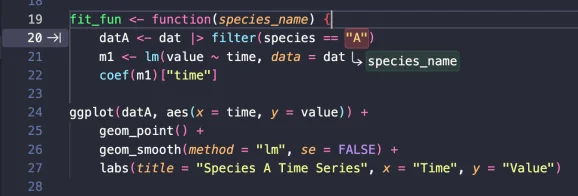
Hitting tab guides you through the required edits to make the code more flexible and dynamic, ultimately leading to a generalized function:
fit_fun <- function(species_name) {
datA <- dat |> filter(species == species_name)
m1 <- lm(value ~ time, data = datA)
coef(m1)["time"]
ggplot(datA, aes(x = time, y = value)) +
geom_point() +
geom_smooth(method = "lm", se = FALSE) +
labs(
title = paste("Species", species_name, "Time Series"),
x = "Time",
y = "Value"
)
}
fit_fun("A")
The initial single-species analysis laid the groundwork, and Copilot’s functionality facilitated the transition to a generalized approach, reinforcing the idea of effective agentic programming.
Driving Functionality with Comments
You can further employ the next-edit suggestions feature solely with comments. By outlining the steps in a coding recipe, you can initiate your coding process under each comment.
An example recipe might look like this:
# Simulate a new dataset of abundance at x-y coordinates
# plot a 2D map
# fit a model with interaction between x and y
With just these comments in place and your cursor positioned correctly, Copilot begins to generate code:
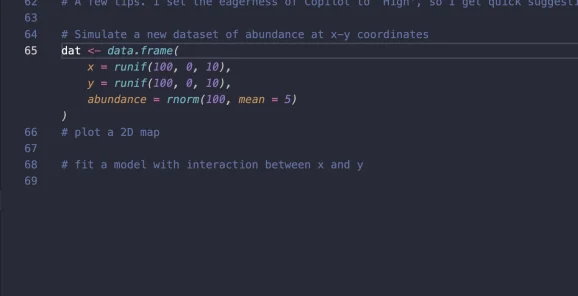
By continuing this process, the final code emerges from the comments and leads to the desired model, incorporating the intended interaction:
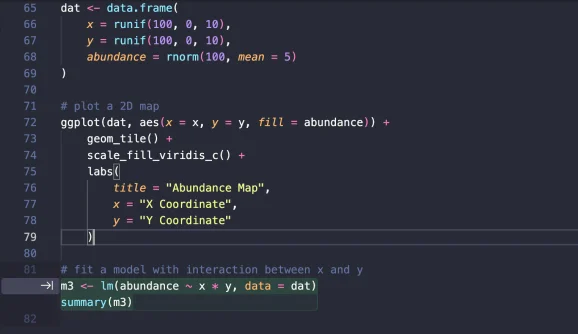
For optimal results with Copilot, consider setting its eagerness to High to receive rapid suggestions. Often, a nudge in the form of typing a few characters can prompt the ghost text to activate.
The clearer and more specific your comments, the more relevant the suggestions will be, ultimately enhancing the programming experience.
Discussion
Sign in to join the discussion.