macOS 27 introduces significant upgrades to iPhone Mirroring, including window resizing, Control Center access, and DRM support that enhance usability.
With the recent release of the public betas for iOS 27 and macOS 27, users can look forward to improved functionality in iPhone Mirroring. This latest version addresses key aspects that enhance the overall experience for Mac users, making it not just an incremental update but a potentially significant upgrade in how users interact with their devices.
Key Updates in macOS 27 for iPhone Mirroring
The most notable enhancement is the newfound ability to resize the iPhone Mirroring window. Before this update, users were tethered to three fixed sizes—small, actual, and large—which limited how they could interact with their iPhones on the Mac screen. With this flexibility, users can adjust the window according to their needs. This is a significant shift in user experience, particularly for those juggling multiple tasks. It's a step toward a more personalized computing environment, reflecting a growing trend throughout the tech industry where customization plays a pivotal role in user satisfaction. Presently, this feature is available only for Apple's native apps optimized for iOS 27. However, as third-party developers update their applications in the coming months, there's anticipation for broader support across various platforms.
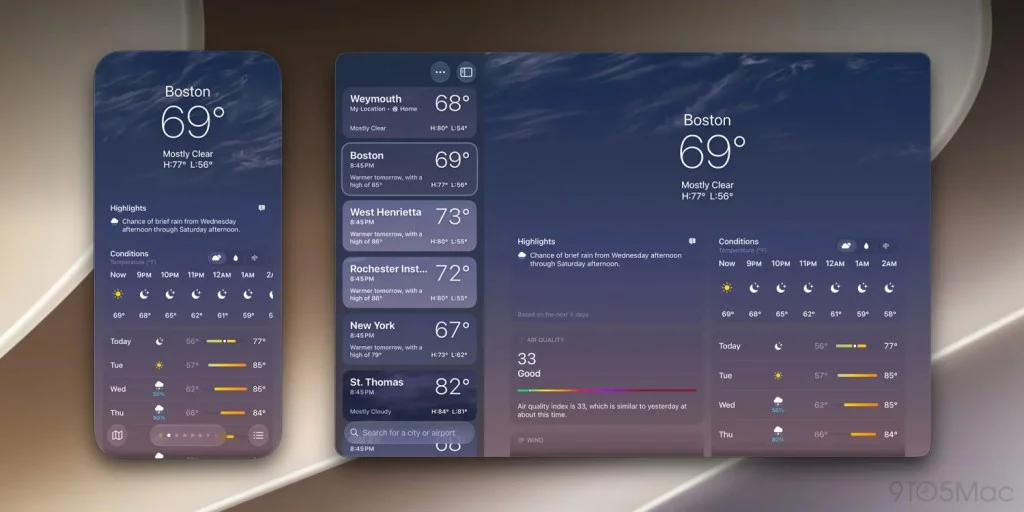
This shift aligns with Apple's preparations for the rumored foldable iPhone Ultra, suggesting a forward-thinking strategy that anticipates future hardware capabilities. By enhancing software like iPhone Mirroring now, Apple seems to be positioning itself for a more integrated ecosystem. Users will likely benefit from a fluid experience when transitioning between devices, tailored to a landscape where foldable technology could redefine conventional use cases.
Enhanced Accessibility and Control Center Improvements
In addition to window resizing, macOS 27 introduces faster access to the Control Center, a feature that can transform daily interactions with Mac devices. Users can now invoke it using the CMD+4 shortcut or from the “View” menu in the Mac menu bar. This adjustment simplifies navigation significantly, cutting down on the number of clicks necessary to access essential settings. Efficiency in accessing these settings not only enhances usability but also speaks to the increasing demand for speed and responsiveness in technology workflows.
Here’s the thing: while it may sound mundane, the Control Center serves as the nerve center for many users, acting as a hub for toggling features like AirDrop, Do Not Disturb, and more. With the rapid pace of work and the continual need for multitasking, having quick access to these options can alleviate frustration and improve productivity. If you're working in this space, you'll appreciate how such adjustments can significantly streamline work processes. It's about the cumulative effect of these small changes leading to a more efficient user experience.
DRM Video Support and Its Implications
Another impactful upgrade is the inclusion of DRM video support in iPhone Mirroring. Previously, users faced a black screen when attempting to play DRM-protected videos, a frustrating limitation for anyone who frequently streams content from platforms like Netflix or Disney+. Now, users can view these videos directly through iPhone Mirroring, significantly enhancing the feature's functionality. While this might seem like a straightforward fix, it actually opens up a myriad of possibilities.
Think about it: this enhancement means you can now engage with multimedia content on your Mac without needing to switch devices or find workarounds. Such flexibility might encourage users to use iPhone Mirroring more often, integrating it into routine workflows. And yet, one has to ponder why these limitations existed in the first place. Was it a precautionary measure in relation to copyright concerns, a lack of resources aimed at making necessary updates, or something else entirely? The transition to supporting DRM content signals a shift in Apple’s approach toward user demands for seamless media interaction, hinting at the company's desire to remain competitive in an ever-growing entertainment-driven market.
Aesthetic Updates: Beyond Functionality
Lastly, users will notice a refreshed app icon for iPhone Mirroring, consistent with the aesthetic updates across other Apple applications. This visual update isn't just superficial; it's part of Apple’s broader initiative to create a streamlined user interface across its ecosystem. These changes may appear trivial, but they contribute to a sense of cohesion that Apple's user base has come to expect. Such efforts reflect an understanding that visual design impacts user perception and interaction, reinforcing brand identity while enhancing user-friendly experiences.
As users explore these new capabilities, the community is eager to hear thoughts on these adjustments. This is more significant than it looks: the updates may lead to greater adoption of the iPhone Mirroring feature, given its newfound versatility and increased functionality. How has your experience with iPhone Mirroring adapted to these changes? Share your insights in the comments below.
Future Outlook and User Sentiment
The release of these public betas isn't just another tick on Apple's calendar; it could very well set the stage for future updates, possibly tied to the anticipated features of the upcoming foldable devices. The focus on user experience, particularly in terms of customization and accessibility, hints at a proactive approach to not just current devices but to a heterogeneous future where form factors may vary significantly. Apple seems poised to address user demands more comprehensively, which could dictate their strategy for some time to come.
Stay connected: Follow me on Threads, Bluesky, Instagram, and Mastodon.
Discussion
Sign in to join the discussion.