KeyAlarm enables users to turn critical calendar events into alarms, ensuring you never miss an important appointment.
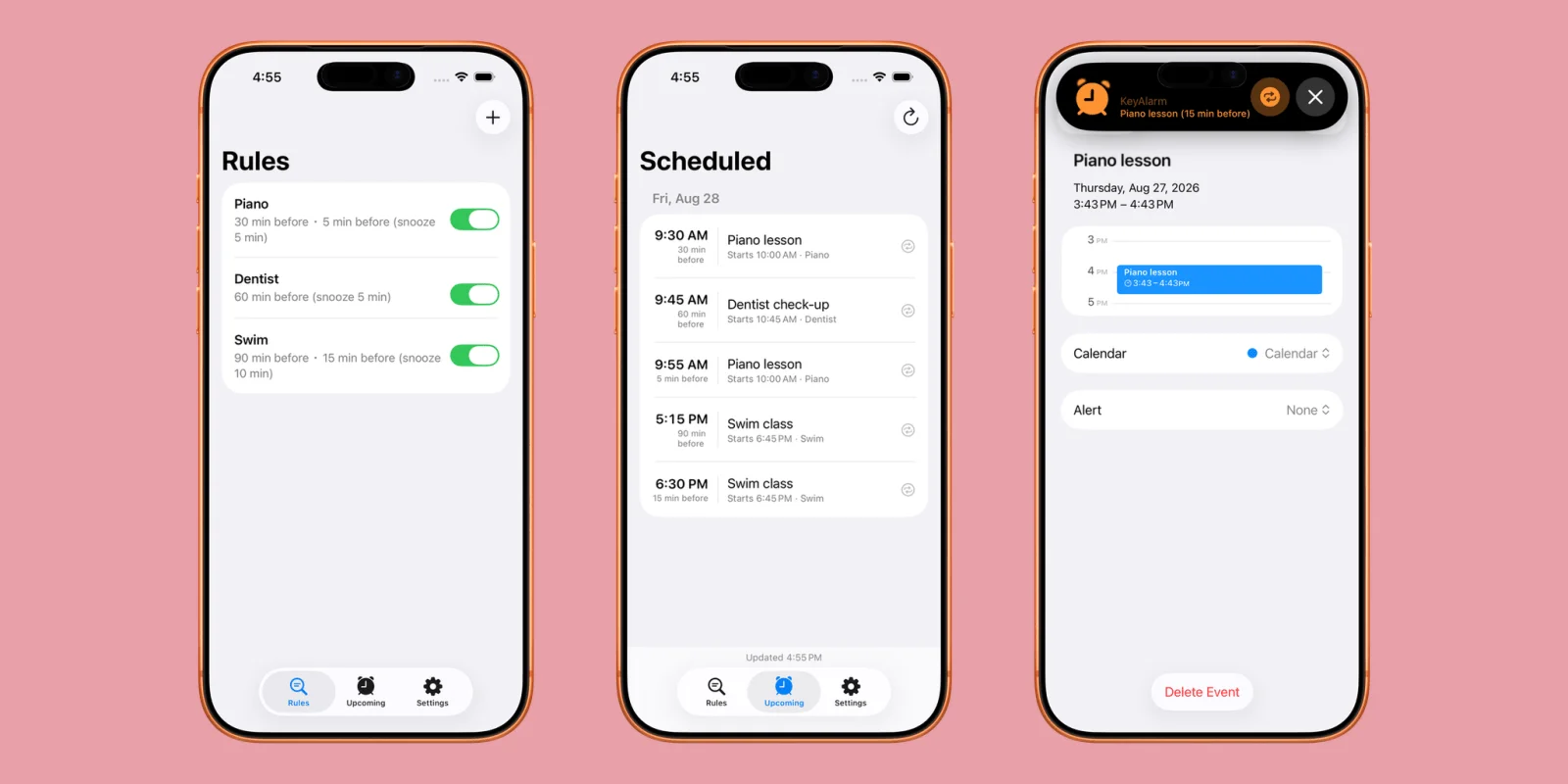
Calendar notifications can easily slip through the cracks, especially if you’re busy or using Do Not Disturb mode. The KeyAlarm app addresses this issue by transforming key calendar events into alarms, guaranteeing you stay updated on your most important commitments.
Understanding the Importance of Notifications
In a world filled with distractions, managing our schedules effectively can be challenging. Smartphone notifications are supposed to help, but they often become background noise rather than helpful reminders. Users frequently toggle features like Do Not Disturb mode, which can inadvertently silence urgent prompts. In this environment, an app that elevates critical calendar events into alarms—like KeyAlarm—serves as a needed solution. By ensuring that reminders won’t be lost, it attempts to rebuild trust in digital scheduling tools. This is more significant than it looks; those lost notifications can result in missed meetings, doctor’s appointments, or key social engagements.
Key Features of KeyAlarm
KeyAlarm stands out with its keyword functionality. Simply designate a specific word, like “Meeting” or “Doctor,” and the app will automatically set alarms for every upcoming calendar event containing those keywords. This feature eliminates the need for manual alarm setup for each instance, significantly streamlining your scheduling process. It represents a shift away from the generic reminder systems where users have to wade through multiple alerts to find what’s pertinent.
Moreover, the app is versatile, allowing multiple alarms for each event. If you prefer a one-hour notice followed by a 15-minute reminder, KeyAlarm accommodates that preference and saves your settings for future events. You won't be stuck reconfiguring your reminders for each meeting; the system remembers your choices, which can save time in the long run. This kind of personalized approach is becoming more necessary as the complexity of daily schedules increases.
In addition to individual events, users can configure alarms for entire calendars. If you maintain separate calendars for work, personal, or family events, you can adjust alarms specific to each calendar with ease. The app's capability to trigger alarms based on keywords at a per-calendar level enhances its practicality. It's not just about customizing experiences; it’s about maximizing efficiency by allowing users to prioritize their commitments without being overwhelmed. This capability is crucial for professionals juggling multiple roles and obligations. (And this is the part most people overlook: the potential for saving considerable mental energy.)
Availability and Pricing
KeyAlarm is available for free on the App Store for iPhones running iOS 26 and above. The app offers a trial period of 30 days, after which you can purchase it for just $0.99, giving you access to all its features without ongoing costs. This model makes it an accessible option for many users who may be hesitant to invest in subscription-based services that dominate the app market today. Offering a flat rate rather than a monthly fee means users aren't tied down financially, which might encourage wider adoption.
With its efficient alarm feature set, KeyAlarm could be the tool that ensures you never overlook another important appointment again. But the question remains, how will it stand out in a crowded app ecosystem filled with productivity and scheduling tools? The app has much to prove beyond its initial appeal.
Implications and Future Outlook
The arrival of KeyAlarm reflects a growing recognition among developers that traditional calendar notifications need enhancements to compete with user demands effectively. As our schedules become increasingly chaotic, there's a rising expectation for tools that not only deliver reminders but do so in a way that's intuitive and user-friendly. If you're working in this space, consider how you can make your workflow less reliant on manual oversight while still ensuring none of your commitments slips through the cracks.
Password apps, project management tools, and even simple to-do applications are incorporating alarm systems, suggesting that the concept of customized notifications could soon become a standard feature across various types of applications. With such trends in mind, KeyAlarm will need continual evolution to stay relevant. User feedback and active development cycles will be critical in determining whether this app can maintain its appeal in the long run, or whether it will be outpaced by competitors that one-up its offerings.
Discussion
Sign in to join the discussion.